The people who use our boards.
425 interviews since 2018



Dino
Seiler
Embedded Engineer
Who are you, and what do you do? What do you like to do outside of work?
Hi, my name is Dino Seiler, and I am an electrical engineer working at 89grad in Switzerland as an embedded software engineer. I am a former motorcycle mechanic who made the transition via electrical engineering to embedded systems / software development.
In my free time, I have been into Thai boxing for twelve years. For the last couple of years I was also part of the trainer team of the club. Two years ago I stopped due to an injury, and since then I have been more into badminton and soccer.
Aside from this I always have DIY/electronics side projects, where I try to automate stuff at home, or try to create new cool stuff (automating cool stuff, to gain more time to do other cool stuff—never works out, and often results in short nights ;) ).
What hardware do you use?
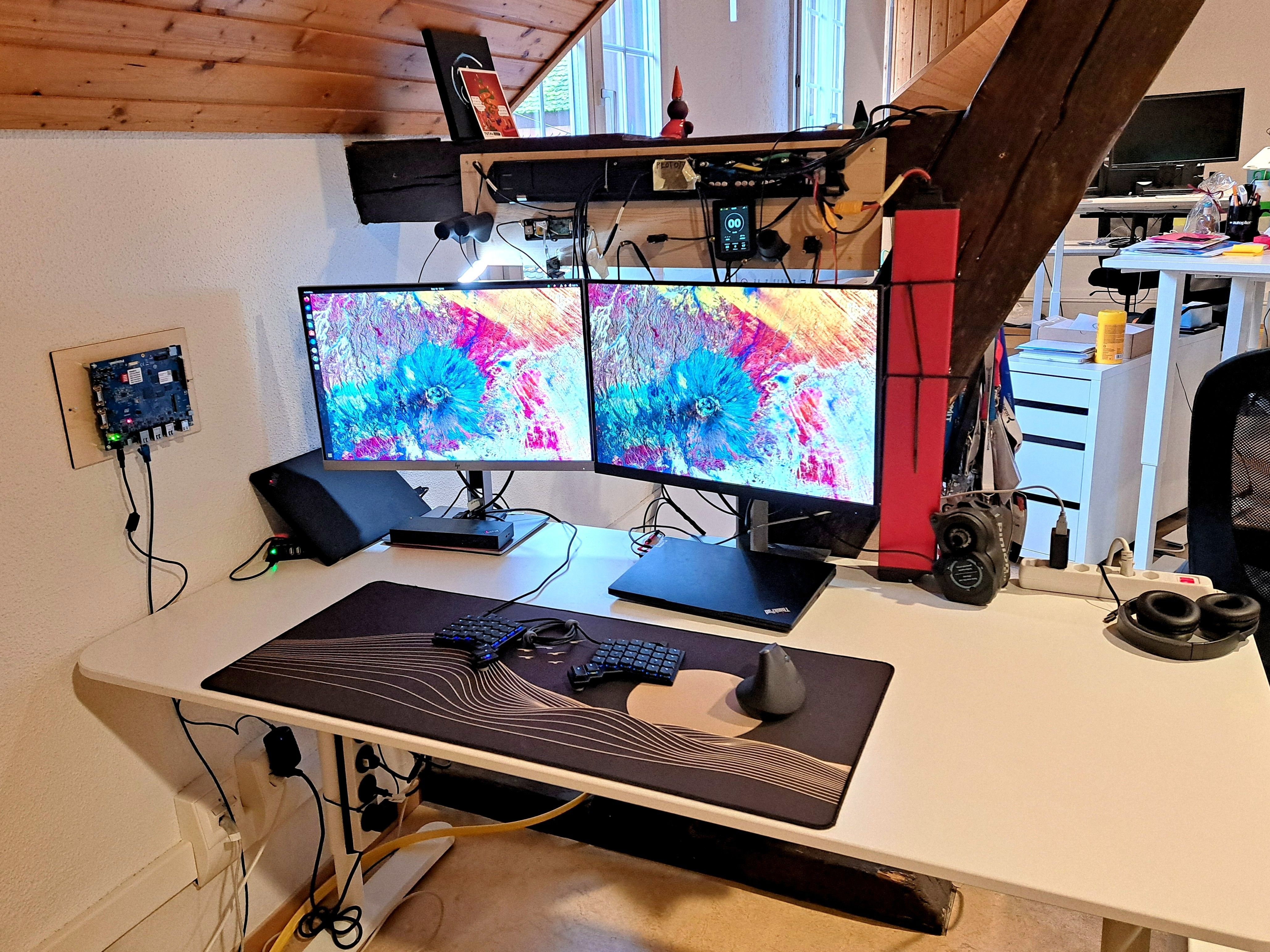
In the office I work on a Voyager in combination with a Logitech MX Vertical mouse.
I work on two different laptops, a ThinkPad P14s laptop with Ubuntu on it, which is my main computer; and a second ThinkPad E14 Windows computer.
I feel the need to explain why I need two different laptops: For certain projects, I need to work with proprietary compilers and IDEs (which only run on Windows). A dual boot setup was not optimal, since I often use our custom-made tools and scripts from the Linux side, to analyze the things going on on the embedded platform, while I operate the IDE / hardware debugger from the Windows machine.
The two screens are 27” HP office monitors, one always wired to the Linux laptop, the other one switching from time to time to the Windows laptop. To ease the switch from one computer to the other, I have a dual-host USB switch. With this switch, it's easy to switch from the Ubuntu machine to the Windows PC without having to rewire keyboard, mouse, and other hardware.
Another important piece of hardware is my headphones. Since I work in an office with lots of people, it can get a little loud, so I really enjoy my Bose QuietComfort noise-cancellation headphones.
I also like a big mouse mat that gives my work space a softer and warmer feeling. With a plain desk, my fingers get cold rapidly, so I use a big mouse mat.
The ThinkPad Thunderbolt 4 Workstation Dock is not only handy for the two monitors, but also a necessity when I have multiple analysis hardware tools in use at the same time. This could, for example, be a logic analyzer, a comm interface like CAN Bus USB adapter, and a hardware debugger, or a power profiler kit.
The stuff on top of the monitors is basically the desktop test setup of an e-bike where I work on the IoT module. And then there is some other wall-mounted hardware for an embedded Linux project we currently are working on.

At home, there is an outdated gaming PC on the work desk, running Ubuntu as an OS. The screen is a 34” curved Dell I got secondhand for free.
In front of it there is the Moonlander in combination with a Logitech MX Vertical mouse.
And what software?
If possible I work on Linux/Ubuntu machines, where I have a Neovim and tmux-centered environment with zsh/OMZ as a terminal.
Apart from that I mostly use the pre-installed Linux applications like Thunderbird, LibreOffice and so on.
When I have to work on Windows, there is not much installed except for the programming-related applications, which are some kind of proprietary IDE like IAR Embedded Workbench or arm KEIL uVision.
When it comes to writing firmware, there are a number of software programs involved.
There is quite important hardware and vendor-specific software like nRF Connect for Desktop plus its specific apps, or the different STM32Cube software packages, or Zephyr OS.
For embedded debugging, I often work with GDB plus a customized GDB dashboard.
When designing electronics (which has become quite rare with my current employer), I work with KiCad. The designs we make ourselves are not so complicated that proprietary tools like Altium Designer were worth it.
Obviously we use Git a lot, in combination with GitLab. Also for documentation, most of our doc is done in GitLab wiki pages.
I use many other software tools, such as savvycan for analyzing CAN-Bus traffic, Wireshark for network analysis, and the Saleae Logic Analyzer UI for examining various protocols, among others.
What’s your keyboard setup like? Do you use a custom layout or custom keycaps?
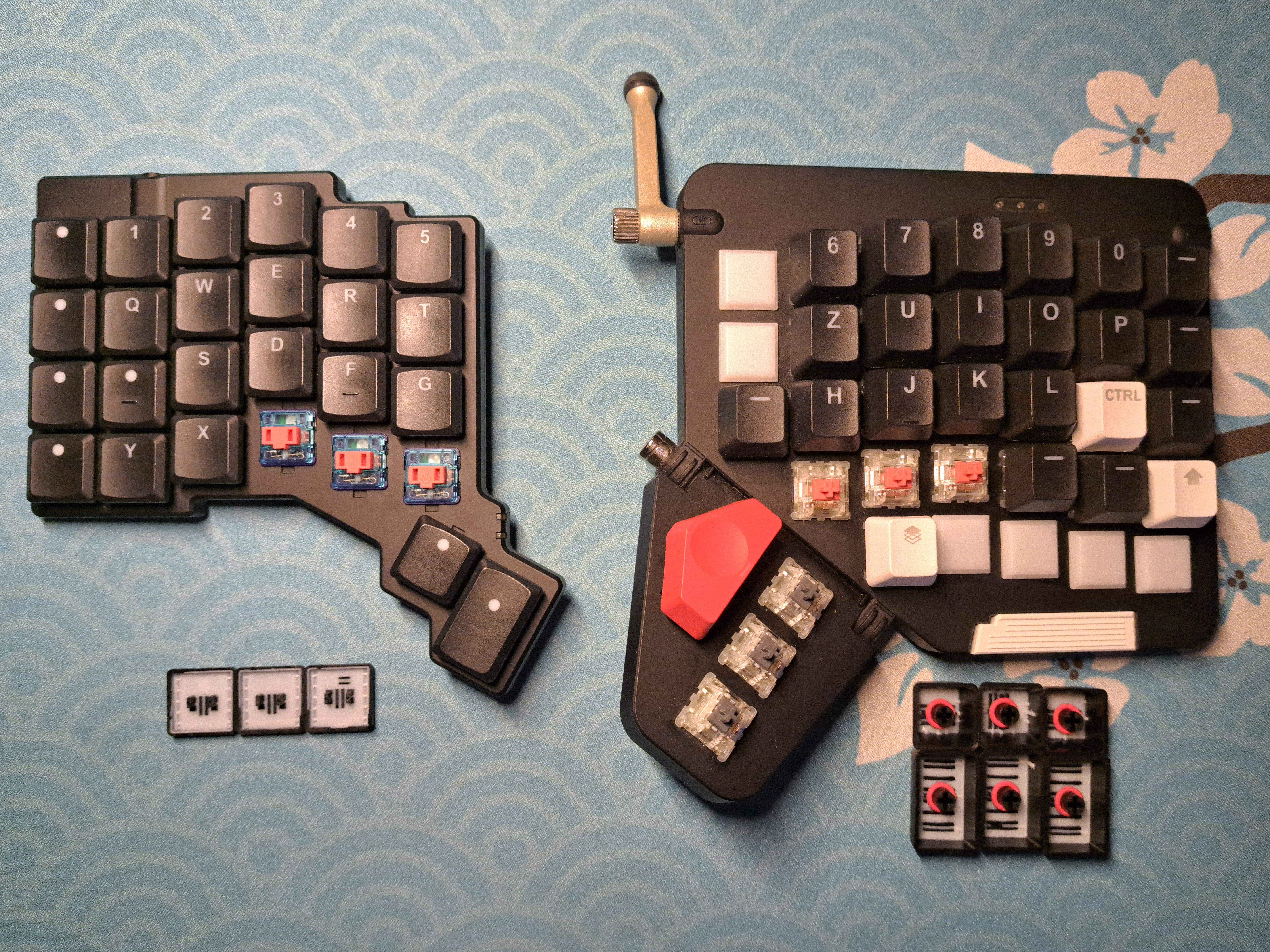
I use a custom layout for both the Moonlander and the Voyager. At first the Moonlander was configured a little differently, with more keys and functions, but over time the two layouts became more and more similar.
One key feature of the layouts is home row mods, but in a different order from the original suggestions. Shift under the index finger was not intuitive enough for me. And also <Ctrl> + <Shift> had to stay on pinkie and ring finger for copy-paste actions.
I use a Swiss German base layout, to have access to all the (Swiss) German and French special characters. In addition, I have a dedicated symbol layer as the first layer, with symmetrical aligned symbols for left and right hand; an arrow layer with Vim-style placed arrow keys; and a number layer on the home row, often used when entering long numbers.
Now some words on the keyboard switches. Since I work in a big office with about twenty co-workers (and do night sessions at home), the goal for the switches is to be as quiet as possible, not to disturb other people.
For the Voyager I settled on Ambients Silent Kailh Low Profile Choc Switches (linear 50 gf). At first I tried the 35-gf linear switches, but they were too light for me. Since my fingers often rest on the home row, with the light switches I often activated the keys by accident. So I switched to the 50-gf version, and with those I am really happy.
On the Moonlander I use a switch with somewhat similar characteristics, CHERRY MX SILENT RED (linear 45 gf), except for the thumb keys. On the thumbs I use a little heavier silent switches (linear 60 gf).
What would be your dream setup?
If I were to change anything it would be the following three points:
- With the focus on programming, I would go for a single-screen setup with one big 16:9 OLED screen (32”) with 4K resolution. With my current text editor setup, I do not really need multiple windows open in parallel. On my wide screen, it often takes more time to do the head and eye movement and find the orientation on a split window, than to just switch the file in the same window. Since switching between windows goes so fast, I believe, that the extra height is more beneficial than the added width of a wide screen. I’d like the OLED screen for when the sun light directly shines on the display from the back.
- I really like the aesthetics of small computers. I would replace my PC with a powerful Small Form Factor PC; maybe one of the small TUXEDO Computers builds.
- I would change my desk for a large standing desk.