



The people who use our boards.
428 interviews since 2018




Adam
Pollard
Senior Product Manager
Who are you, and what do you do? What do you like to do outside of work?
I’m Adam Pollard. I’m a senior product manager at ROLI, a Series A venture-backed music tech startup, where I work on the tools people use to make music.
The decade before ROLI went into Multiplier, a business I founded that served electronic music producers and DJs. Part of it was a popular YouTube channel, and a suspicious number of those videos show me rearranging my studio. Some obsessions announce themselves early.
On the personal side, I built Hidden Lines, an iOS app that uses AI-powered computer vision to autogenerate routes for home climbing walls.
Outside work I’m outdoors: bouldering, ultra running, and mountain biking in the mountains here in the Lake District (UK), where I live.
What hardware do you use?
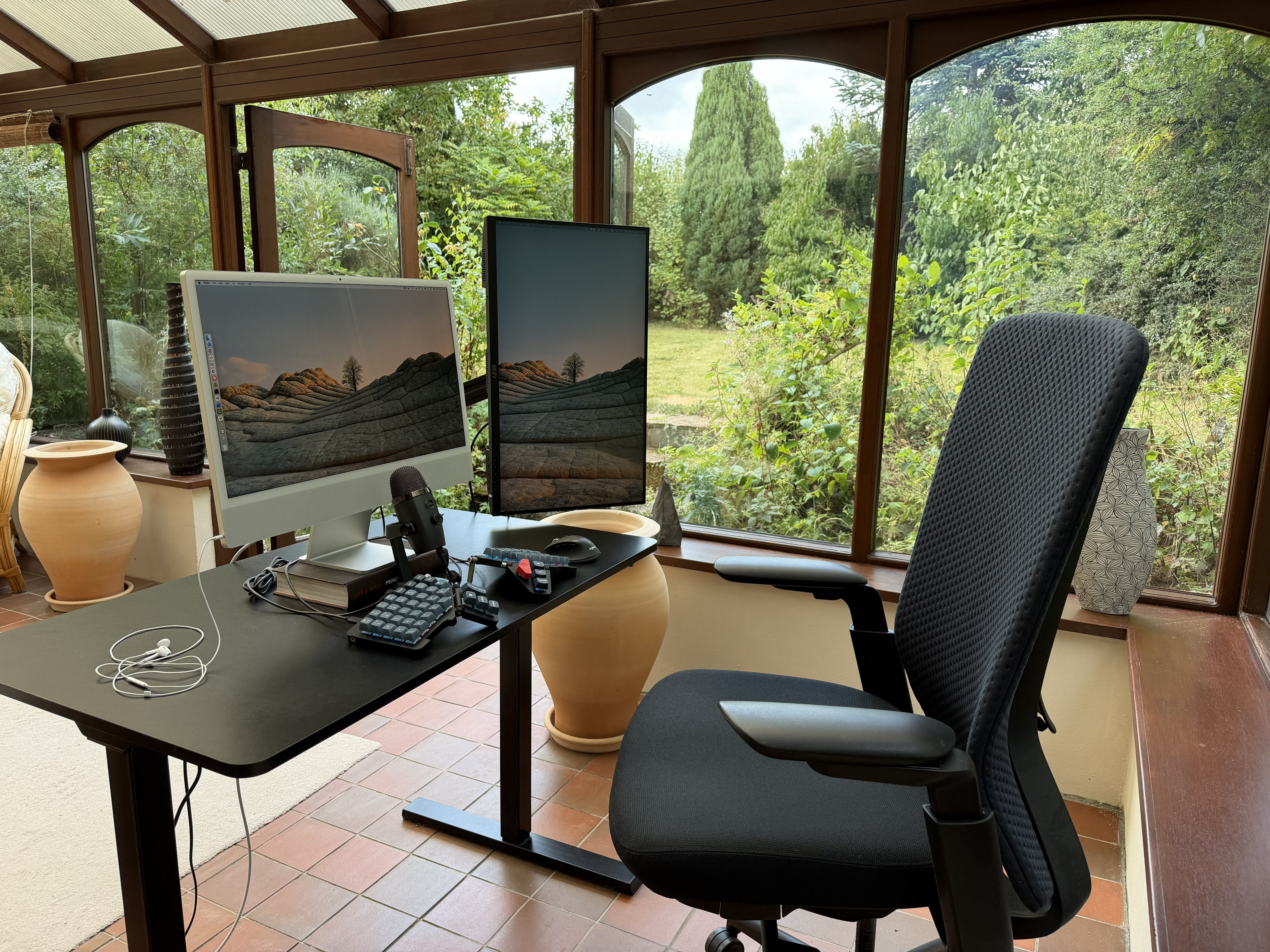
I’ve worked remotely my whole life. This taught me that the room is as much a part of the setup as anything on the desk. So when I was house-hunting up here, the most important room at every viewing was the one I’d be working from. This house won because of the conservatory.
I’m an outdoorsy person who would basically always rather be outside, and working from a conservatory is the closest a desk job gets: glass walls on three sides, doors and windows open, air moving through, lots of green to look at. Like sitting in the garden, but dry. Yes, all that glass makes the room a greenhouse in summer and a colander for heat in winter, but it also makes it the brightest, most energising place I’ve ever worked. There’s a practical bonus, too. A diffuse glass roof is effectively one enormous softbox, so I look great on video calls without any supplemental lighting.
I also get to watch wild rabbits hop about whilst I work. In theory they’re a distraction. In practice they are joyful and contribute to me wanting to spend time at my computer.

As for the gear itself, my operating principle is to buy the cheapest possible version of a thing first, treat it as an experiment, and upgrade to the nice version of that thing if the experiment succeeds. And sometimes the cheap version is totally fine and stays indefinitely.
Center of the action is a 24″ iMac. This was partly a value call, since in 2021 a third-party display of that quality cost about as much as the whole machine, which made the computer inside effectively free. Mostly, though, screens are somewhere I refuse to economise. A display fires light into your eyeballs for eight hours a day. Like the chair you sit on or the keyboard you touch, it’s something you spend a meaningful fraction of your entire life interacting with.
The iMac stands on a book. Apple, very cleverly, didn’t make the iMac an ergonomic height. The top of a display should sit at about eye level, which leaves a gap to fill. If a book is going to live in my eyeline all day, it may as well be one whose ideas I want to be reminded of. I selected Ray Dalio’s Principles. With a height-adjustable stand, I’d probably have forgotten them by now.
The second monitor, mounted vertically to read long docs and AI responses without scrolling, is still an experiment. In some sense, one large display, split into two halves, with efficient window management keyboard shortcuts, is all you ever need. Humans can’t look at three windows at the same time. But sometimes it is nice to monitor three or four apps without juggling windows.
While we’re on displays, a confession. Neither of mine is tilted correctly. The iMac often points up more than my eyes would like, because tilting it up is the only way the built-in webcam frames my head correctly on calls. An angle chosen for the camera is the wrong angle for the eyes. I’d file that under Apple design error rather than user error. The second monitor often sits off its ideal angle too, because its terrible design doesn’t hold the tilt angle. That’ll teach me for ignoring the buy-once-cry-once rule. Poor excuses for unacceptable tilting behaviour, I know. I promise to do better.
The microphone is a first-class citizen here: It sits permanently in front of me. A third of any working day is calls, and these days I dictate (using Wispr Flow) far more than I type, so the mic earns its placement several hundred times a day. It’s a Blue Yeti Nano, which sits in a sweet spot of being big enough to sound good, but small enough not to block the screen. Calls happen on wired Apple headphones. Wired, because lower latency makes conversation flow that little bit better, and the nonsealing kind, because being able to hear your own voice while you talk keeps you from shouting. Music plays from a Bowers & Wilkins Zeppelin, wireless over AirPlay, controllable using the Moonlander.
There’s also a Logitech M720 mouse. Reasoning from first principles, I do believe that keyboard-only computing really is the ideal, and if I spent all day inside apps that are designed for that world, I’d chase it. But a product manager’s day sprawls across dozens of apps and websites, and many of them simply work better using a proper mouse. I’ve tried the workarounds, Homerow included, and they consistently cost more friction and thought than simply reaching for the mouse. Scrolling in particular is more precise, efficient, and tactile with a scroll wheel. I do lots of scrolling. I tried keyboard shortcuts, trackpads, trackballs, and a Magic Mouse. Nothing else goes exactly where I want as fast as I want. So for half the day one hand sits on a mouse, and I’ve stopped apologising for it.
The desk is a standing desk, though lately I mostly sit. Legs recovering from a big day in the mountains don’t want to be stood on all day.
And what software?
It’s a fairly typical stack for an AI-native product manager in 2026. A lot of my work these days is driven via Claude Code and Claude Cowork, connected to my quiver of SaaS apps via Connectors/MCP. I mostly speak to Claude using Wispr Flow. When I describe my work day to people outside of tech, it sounds like science fiction: “I talked to the magic rectangle in my conservatory and it did things for me.” That’s the world we live in now.
Around that, I use Mixpanel, PostHog, SQL, Jira, Linear, Asana, Notion, Todoist, Slack, Figma, Miro, Typeform, ChatGPT, n8n, Make, Excel, Python, Swift, GitHub, and VS Code.
What’s your keyboard setup like? Do you use a custom layout or custom keycaps?
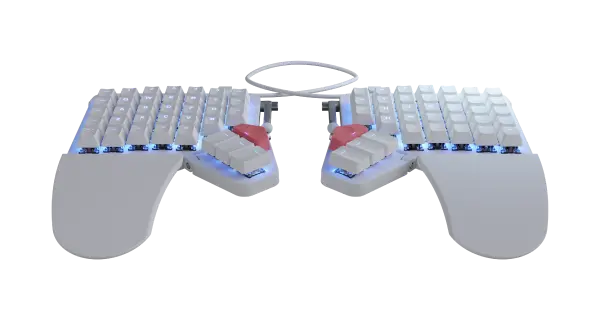
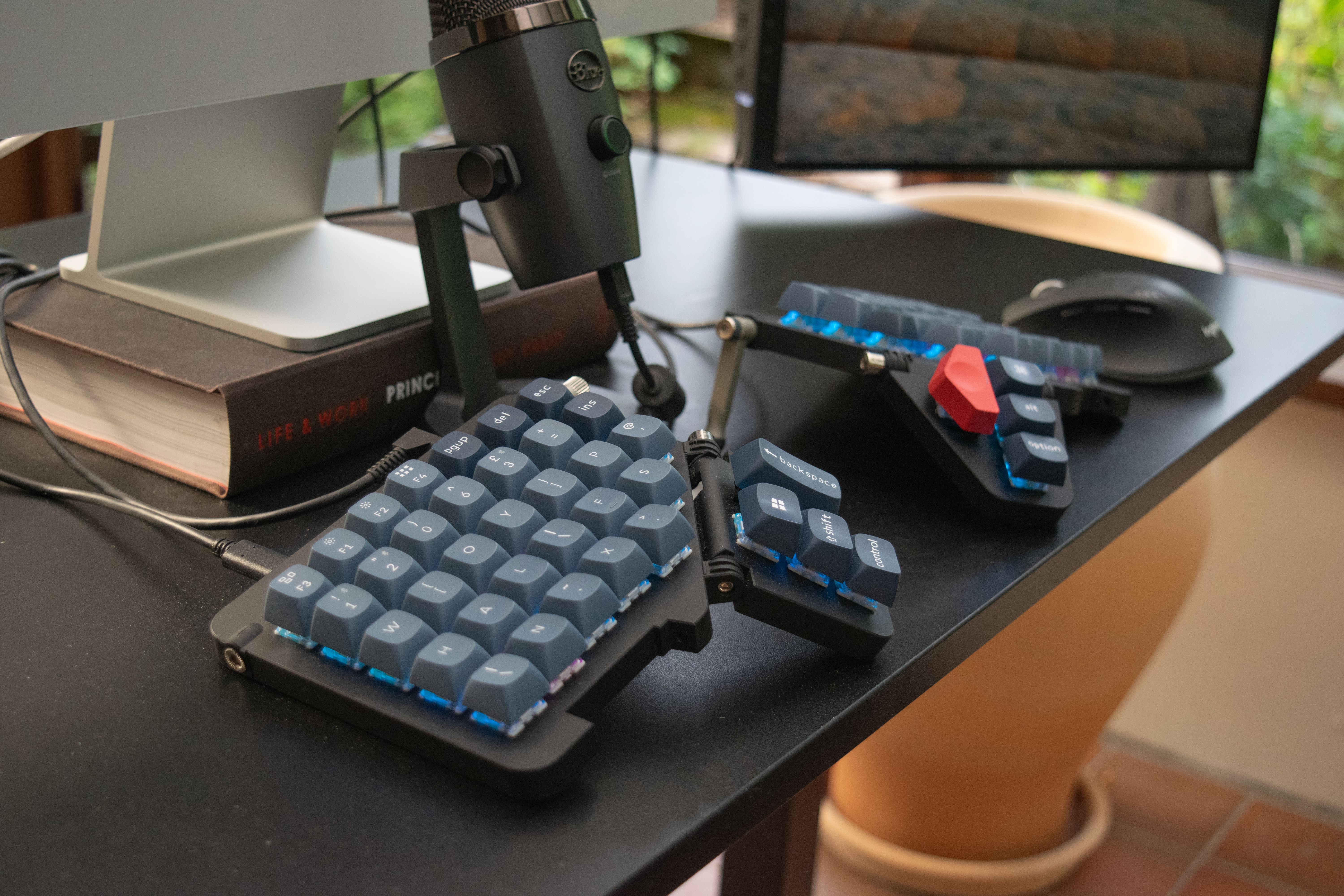
Credit—or blame—for my Moonlander obsession goes to my friend Stuart, founder and CEO of Revalue and semiprofessional surfer. He loves his Voyager and told me to get one. I wanted full-size MX-style switches, so I got the Moonlander. Mine is called Moonie. I use a custom layout, custom keycaps, and custom key switches.
I don’t have an RSI story. My problem was typos. I taught myself to type on a normal QWERTY keyboard with my hands angled inwards, because that’s what my wrists wanted. Index and middle fingers did most of the work, right pinky reserved for backspace. Hands flailed around all over the place, contorting into strange shapes to hold modifiers. I constantly got lost and made typos. Very frustrating.
So I pulled the trigger on the Moonlander and endeavoured to put the most useful keys right under my fingers and thumbs.
I treated this as an exercise in human-computer interaction design. It ran in two steps. Find where my fingers naturally want to rest, then work out which movements away from there feel most natural. Any move longer than one key follows a strict rule: The whole hand moves exactly upwards or exactly sideways, never at an angle. That way I never get lost.
After days of experimentation, I landed on a home position one row lower than the Moonlander uses by default, mostly so that the lower thumb keys stay comfortably in reach with the board fully tented (more ergonomic than lying flat on the table). The pinkies sit one row lower still. In the screenshot of my home layer, the pink-lit keys are my home keys.
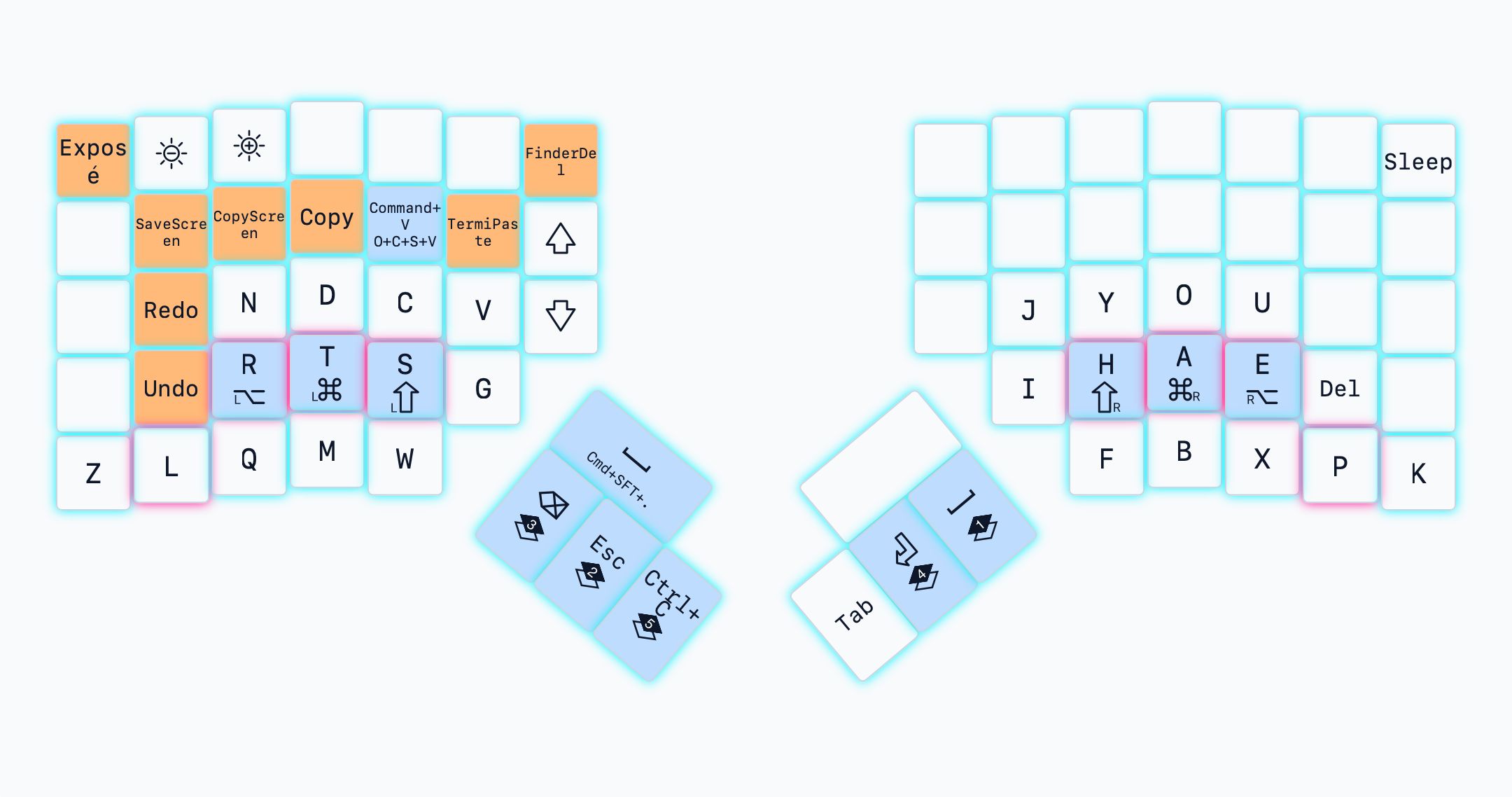
For the letters, I started from Gallium, one of the layouts the Alternative Keyboard Layouts (AKL) community has designed for pure efficiency, with no concessions to easing the transition from QWERTY. I didn’t agonise over which of the optimised layouts to pick, since individual keys can always be nudged later. I bent Gallium around those constraints until every letter sat somewhere comfortable.
I went in with eyes open, knowing that learning this radical new layout would take months. The time investment made perfect sense though. I just thought about how much of my life I spend typing. It did take months to learn and it totally worked. I never look at the keyboard now, I don’t make typos, and the gap between thinking and seeing it on screen is the smallest it’s ever been. Also, relief. That’s a lot of hours to gamble on a theory.
In practice I have two home states, split about 50/50: 1) both hands on keys and 2) left hand on keys and right hand on the mouse. Only my left hand is on Moonie in both, so most things I need at any moment live on the left, and most of it exists to remove friction between me and the AI agents I work with. A good example is the “CopyScreen” shortcut I set up, which screenshots a region you draw and adds it to the clipboard, ready to be pasted into Claude Code/Cowork, ChatGPT, Slack, or whatever else. I find this quicker than copying text, and the AI models happily read text from screenshots. Tiny note: There’s a dedicated “TermiPaste” key, because pasting into the terminal where Claude Code lives isn’t a normal ⌘V.
I’ve recently given the left hand a bunch of combos, where two or more keys pressed together act as one key. One pair of home keys starts Wispr Flow; another pair sends Enter, ending the dictation and pasting it wherever my cursor is. The row above has one combo to open a fresh Claude thread and another to start a fresh ChatGPT thread. And a few more make one-handed commas and full stops for fixing dictation while my right hand stays on the mouse. I control Spotify exclusively with left-hand combos now too. I’m at fifteen combos currently, adding one or two a week. I’ll keep going down this rabbit hole. There are several real ones just outside the window for inspiration.
Beyond that there are layers for numbers, punctuation, cursor movement, etc… And home row mods. Usual stuff.
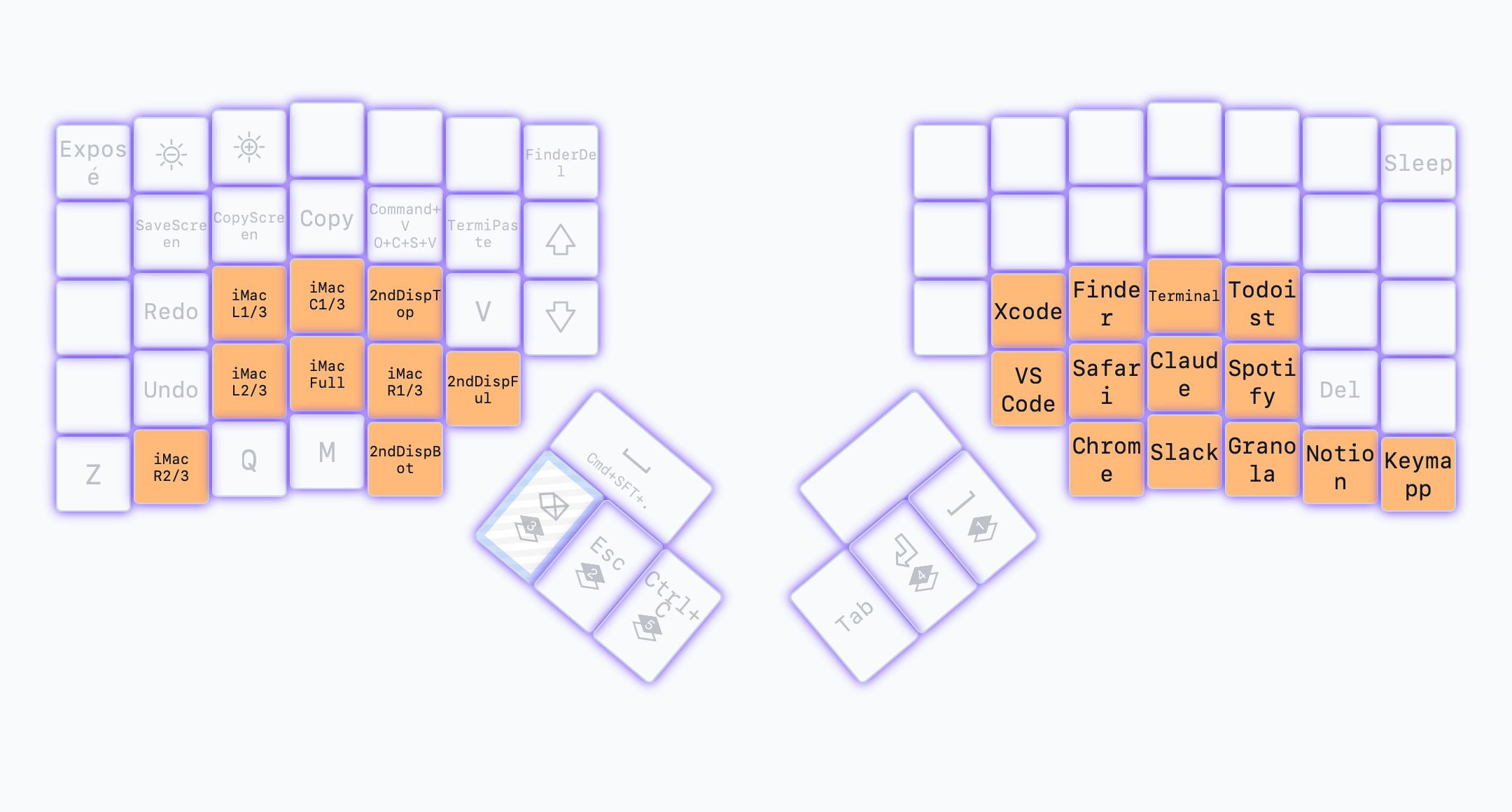
A layer I lean hard on is activated by holding the top left thumb key. The left hand does window management, sending the focused window to thirds and two-thirds of the iMac, halves of the second screen, or full screen on either. The right hand becomes an app launcher and focuser, one key per app, so Claude, Slack, Spotify, the browsers, and the rest are each a single press away. The board just sends hotkeys: a custom Hammerspoon script does the actual moving and launching. With the right hand on the mouse instead, launching apps is the mouse’s job, via the Dock, parked permanently on the left edge of the screen. Left edge, because nearly every window is constrained vertically rather than horizontally, so the vertical pixels are the ones worth protecting.
Switches are Gateron Jupiter Bananas, transplanted from a Keychron I had lying around. They’re tactile, on the heavy side of medium. The bump is doing real work. When I roll five or six keys in a quick burst, it’s the confirmation I feel that every key actually fired. Wispr Flow gets used when I want to input thought as fast as possible into my computer, so I need neither speed, silence, or a light activation pressure from my keyswitches.
The keycaps came off the same Keychron, for no reason more defensible than subjective preference. The homing bumps sit on my real home keys. Every other cap is placed at random. Or, as random as possible while matching each cap’s row profile to my one-row-lower home position. There was never any hope of the legends matching my custom layout, so I leaned in. It looks chaotic, which is fun—and nobody else can type a word on it, which is also fun.
What would be your dream setup?
Since I have ZSA’s undivided attention: a wireless Moonlander, please. Wires are messy. It’s the same perspective that has me on an iMac rather than a Mac mini/Studio. The real dream is a single 48-inch 10K or 12K iMac. One enormous, pin-sharp screen with a good window manager beats multiple monitors. I already juggle window tiles on the 24-inch, and I’d rather do that juggling on one giant canvas. Somewhat depressingly, I don’t think Apple is going to build me one any time soon. Then again, there’s a new CEO taking the wheel over there, so you never know. Perhaps we live in a different future now.
Back on Earth, the list turns fussy. I want standing-desk legs that go lower. Currently, to get the tabletop correct ergonomically relative to my chair, my chair must be at max height, which means my feet aren’t supported by the floor without a footrest. Plus I want a desk that’s a nicer object to share a room with. And slightly more comfortable armrests. And the latest MX Master mouse. Every day I hope my Logitech M720 gives up, so I can justify the upgrade.
Can you recommend a few books, movies, TV shows, or games (digital or otherwise) that you’re quite into?
Watch the film Free Solo, if you somehow haven’t. It follows Alex Honnold’s attempt to climb El Capitan, a 3,000-foot wall in Yosemite, alone and without a rope. Then watch The Alpinist, which follows Marc-André Leclerc, a Canadian quietly soloing enormous alpine faces in winter. Being a climber, I watch lots of free soloing, but Honnold at least had dry, solid granite to hold on to. Leclerc plays the same ropeless game on ice and frozen rock, in proper mountain weather, in positions so exposed they make Free Solo look safe. Both are fascinating, engaging human stories, and both are really films about risk, about what it’s for and how much of it a life should carry. That question doesn’t stay in the mountains.
Also, there are some great documentaries on YouTube about the Barkley Marathons. The Barkley is probably the hardest endurance race on Earth. Competitors have 60 hours to run 120 miles, 120,000 ft. of elevation gain on unmarked loops in Tennessee woods. No sleep. Most years no-one finishes it. Wild.